Roles
Access · Permissions · Security
Role Management
Roles define user permissions and access levels within the Talencia system. They ensure that users have appropriate access to system features based on their responsibilities and authority.
Role creation
Define user roles with specific permissions.
Permission management
Control access to system features.
Security enforcement
Ensure proper security protocols.
Key Features
Essential role tools.
Role Creation
Define user roles with specific permissions.
Permission Management
Control access to system features.
Hierarchical Structure
Organize roles in hierarchical structure.
Audit Trail
Track role assignments and changes.
Security Enforcement
Ensure proper security protocols.
Roles Management Overview
Visual guide to role management features.
This video demonstrates the complete role management workflow including role creation, permission assignment, user management, and administrative features.
Company User Roles
Predefined company roles with specific permissions.
System Administrator
Full system access and control. Can manage all users, roles, and system settings.
Manager
Department and team management with oversight capabilities.
Staff Member
Basic access for regular staff to perform daily tasks.
Viewer
Read-only access to information and reports.
Permission Categories
System permissions organized by functional area.
User Management Permissions
users.viewView user listusers.createCreate usersusers.updateEdit usersusers.deleteDelete usersRole Management Permissions
roles.viewView rolesroles.createCreate rolesroles.updateEdit rolesroles.deleteDelete rolesProject & Job Management
projects.viewView projectsprojects.createCreate projectsjobs.viewView jobsjobs.createCreate jobsFinancial & Client Management
finances.viewView financesclients.viewView clientsclients.createCreate clientsshifts.viewView shiftsRole Assignment
How roles are assigned to users.
Admin Assignment
System administrators are assigned during initial setup and have full access.
Manager Assignment
Managers are assigned by administrators and can manage department resources.
Dynamic Assignment
Roles can be dynamically assigned based on project requirements and user responsibilities.
Time-based Access
Temporary roles can be assigned for specific time periods or projects.
Data Grid Features
Advanced table capabilities for role management.
Real-time Search
Search by role name with instant results and server-side filtering.
Server-side Pagination
Handle large datasets with configurable page sizes (10, 25, 50, 100, All).
Column Sorting
Server-side sorting by role name, creation date, and user count.
Bulk Operations
Select multiple roles for bulk delete operations.
Row Actions Menu
View, Edit, Delete, and Manage Permissions actions.
User Count Display
Shows number of users assigned to each role in real-time.
Data Grid Visual Examples
Visual demonstrations of role management interfaces.
Roles Data Table
Main roles list with search, pagination, and bulk operations

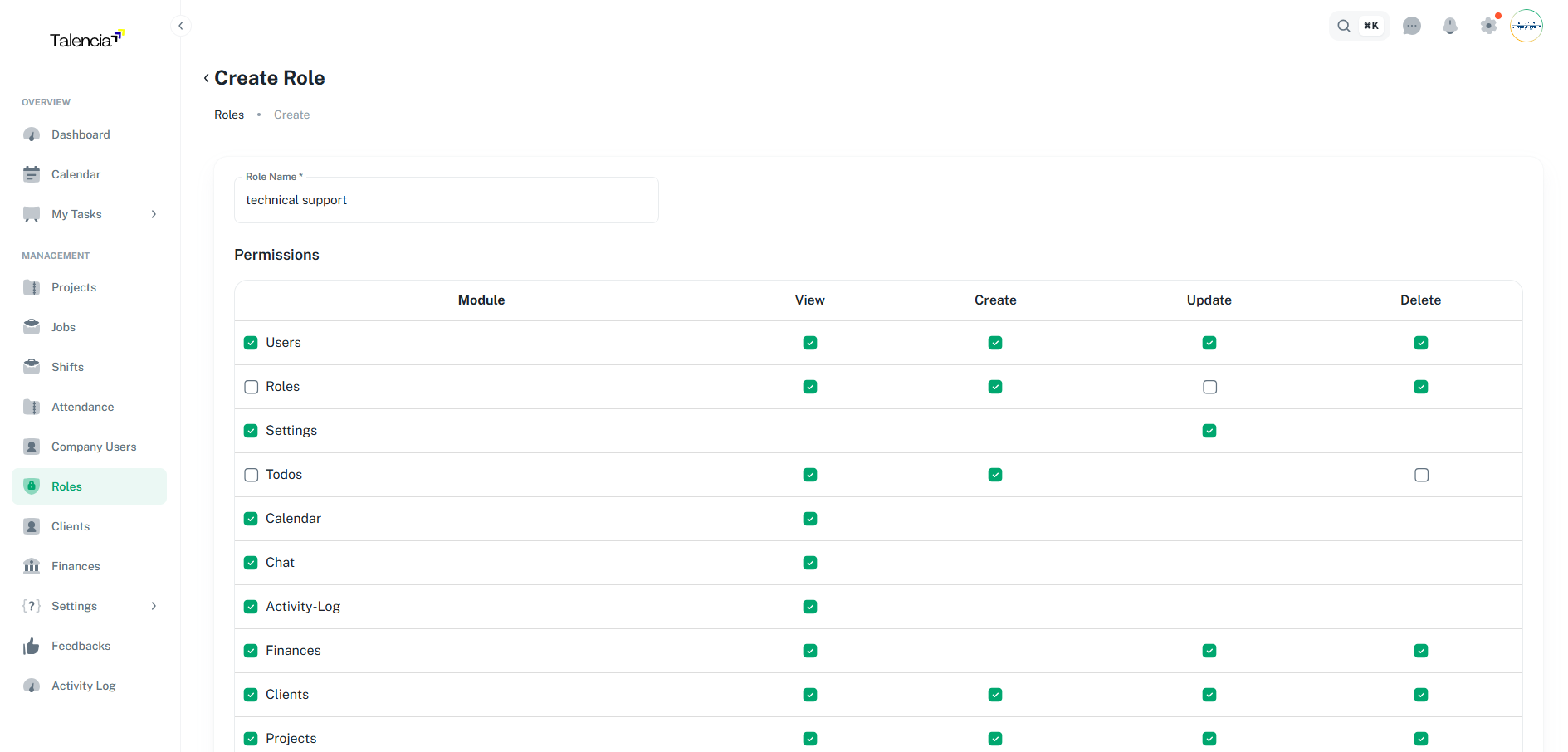
Create Role Screen
Role creation form with permission assignment and validation
Best Practices
Role management guidelines.
| Practice | Recommendation |
|---|---|
| Principle of Least Privilege | Grant minimum necessary access for each role |
| Regular Reviews | Review role assignments and permissions quarterly |
| Clear Documentation | Document role responsibilities and permission sets |
| Audit Monitoring | Monitor role changes and access patterns |
| Role Naming | Use clear, descriptive role names that reflect responsibilities |
Troubleshooting
Common issues and solutions.
| Issue | Fix |
|---|---|
| Can't create a new role | Contact your administrator to ensure you have the right permissions to create roles |
| Roles list not showing | Try refreshing the page or check your internet connection. If the issue persists, contact support |
| Can't use duplicate role names | Role names must be unique within your company. Choose a different name for the new role |
| Permissions not working correctly | Contact your administrator to refresh the system permissions |
| Can't delete multiple roles | This feature may not be available for your role. Please check with your system administrator |
Security Considerations
Security guidelines for role management.
- Multi-factor authentication for sensitive roles
- Session timeout and automatic logout
- Role expiration policies
- Access log monitoring
- Compliance verification