Shifts
Scheduling · Time Management · Coverage
Shift Management
Shifts are the scheduled time periods when work is performed, forming the backbone of your workforce scheduling. Shifts define when and where work happens, allowing you to organize your workforce efficiently and ensure adequate coverage.
Shift creation
Create and schedule work periods.
Assignment management
Assign staff to specific shifts.
Time tracking
Monitor shift start and end times.
Key Features
Essential shift tools.
Shift Creation
Create and schedule work periods.
Assignment Management
Assign staff to specific shifts.
Time Tracking
Monitor shift start and end times.
Coverage Planning
Ensure adequate staffing levels.
Conflict Detection
Identify scheduling conflicts.
Shift Types
Various shift categories.
Regular Shifts
- Standard work hours (e.g., 9 AM - 5 PM)
- Consistent daily or weekly schedules
- Predictable patterns for planning
Split Shifts
- Work periods divided into multiple segments
- Common in industries with peak demand periods
- Flexible scheduling options
Rotating Shifts
- Cyclic schedule patterns
- Rotating through different time periods
- Fair distribution of desirable/undesirable shifts
On-call Shifts
- Standby availability for emergencies
- Variable activation based on demand
- Premium compensation for availability
Shift Groups
Some jobs or sub-jobs provide shift groups that the user must pick during application. This allows for:
- Multiple scheduling options within the same role
- Different shift patterns and availability preferences
- Flexible workforce allocation
- Better matching of staff to preferred schedules
Shift Management
Creating Shifts
- Define time period and duration
- Specify location and work requirements
- Set staffing needs and qualifications
- Assign or open for applications
Assigning Staff
- Manual assignment by managers
- Self-service sign-up for available shifts
- Automatic matching based on qualifications
- Swap and trade functionality
Monitoring Shifts
- Real-time attendance tracking
- Overtime monitoring
- No-show alerts and coverage
- Performance metrics
Shifts Management Overview
Visual guide to shift management features.
This video demonstrates the complete shift management workflow including shift creation, group management, status tracking, and advanced features like filtering and bulk operations.
Status Workflow
Shift lifecycle management.
Opened
Shift is open for applications and staff assignment.
Running
Shift is currently in progress and active.
Completed
Shift has been successfully finished and processed.
Closed
Shift is closed and no longer active.
Data Grid Features
Advanced table capabilities.
Real-time Search
Search by shift name, location, job, or project with instant results.
Status Tabs
Quick filter by shift status with live count badges.
Row Actions Menu
View, Edit, Delete, and manage shift actions.
Server-side Pagination
Handle large datasets with configurable page sizes (10, 25, 50, 100, All).
Column Sorting
Sort by name, location, price, dates, status, job, and project.
Bulk Operations
Select multiple shifts for bulk delete operations.
Column Management
Show/hide columns, adjust density, customize table layout.
Date Range Filtering
Filter shifts by start and end date ranges.
Permissions
Required permissions for shift operations.
| Action | Permission |
|---|---|
| View Shifts List | shifts.view |
| Create Shift | shifts.create |
| Edit Shift | shifts.update |
| Delete Shift | shifts.delete |
| Bulk Delete | shifts.delete |
Merge Variables (Examples)
Available merge variables for shift operations.
| Variable | Description |
|---|---|
{{ shift.name }} | Shift name/title |
{{ shift.status }} | Current shift status |
{{ shift.location }} | Shift location |
{{ shift.start_date }} | Shift start date and time |
{{ shift.end_date }} | Shift end date and time |
{{ shift.price }} | Shift price/rate |
{{ shift.job_title }} | Associated job title |
{{ shift.project_title }} | Associated project title |
Visual Examples
Visual demonstrations of shift management interfaces.
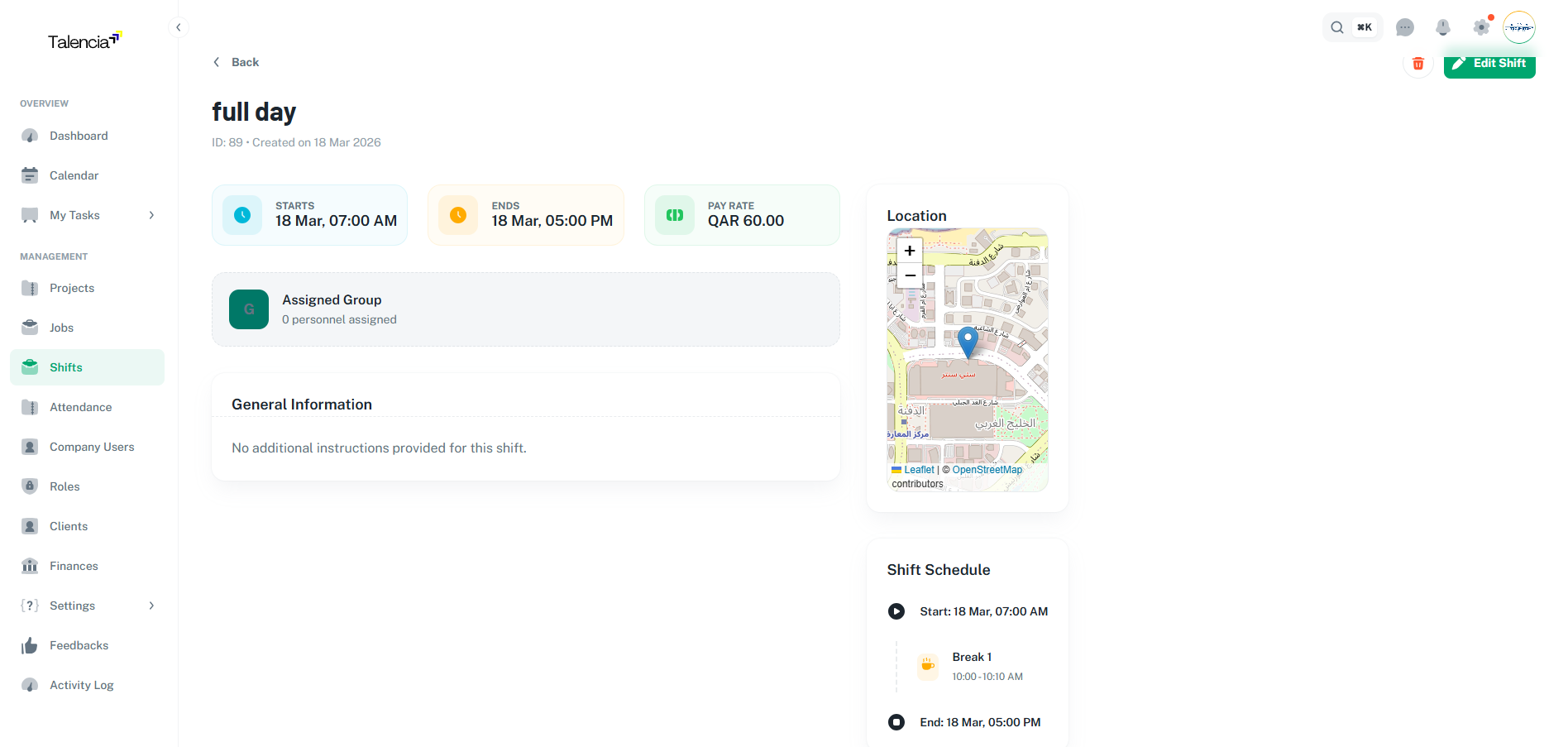
Shift View
Detailed shift view with group management and scheduling information
Single Shift Creation
Complete walkthrough of creating shifts with groups, breaks, and scheduling
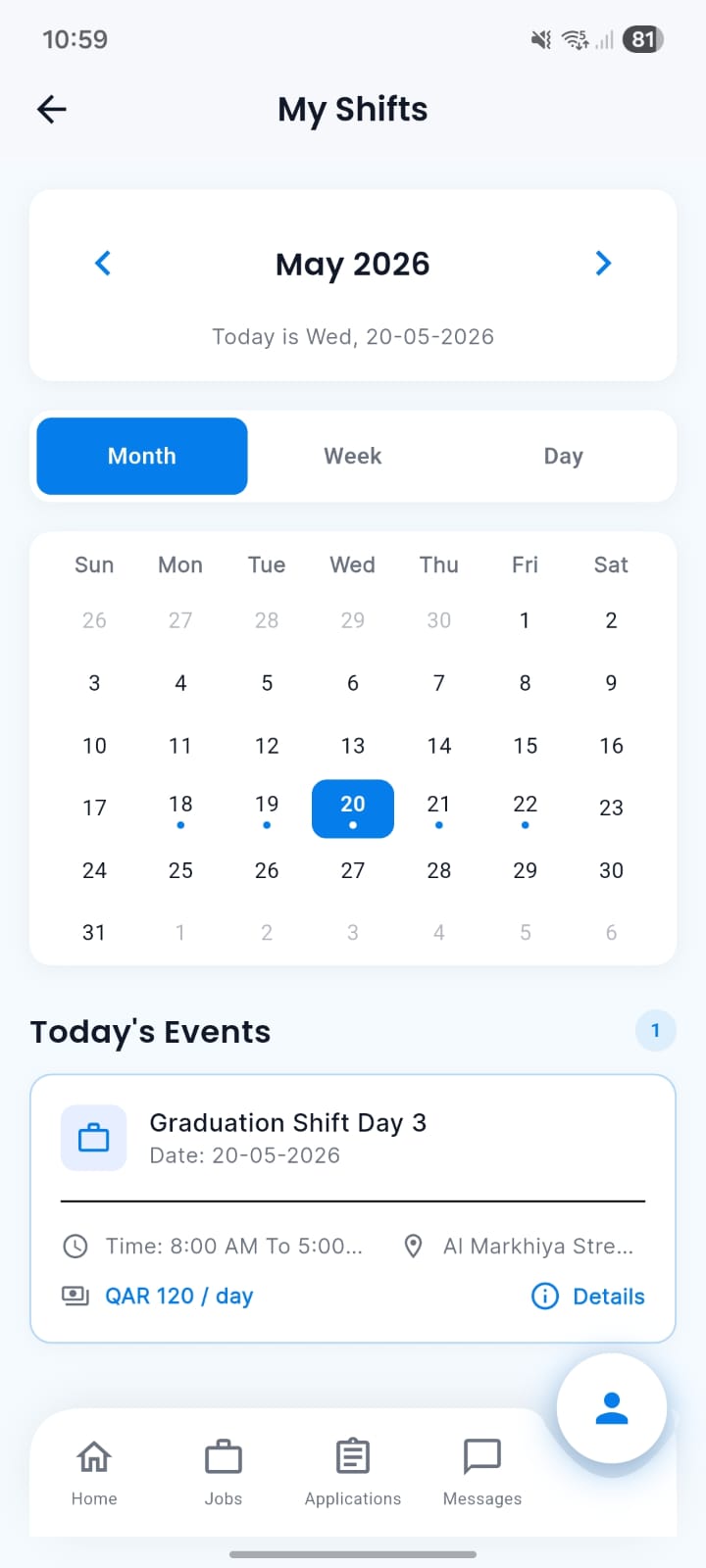
Talent Mobile Shifts Calendar
Talent can check their shifts and attendances directly from the mobile calendar view.
Best Practices
Shift management guidelines.
| Practice | Recommendation |
|---|---|
| Shift Planning | Create shifts well in advance with clear dates and times |
| Group Management | Use shift groups for complex scheduling patterns and multiple roles |
| Status Updates | Regularly update shift status to reflect current state |
| Break Scheduling | Include proper breaks to comply with labor regulations |
| Location Details | Provide clear location information for easy staff navigation |
Troubleshooting
Common issues and solutions.
| Issue | Fix |
|---|---|
| Can't create a new shift | Contact your administrator to ensure you have the right permissions to create shifts |
| Shifts list not showing | Try refreshing the page or check your internet connection. If the issue persists, contact support |
| Can't create shift groups | Make sure the job has valid dates and is properly set up before creating groups |
| Getting break time errors | Ensure break times are within the shift duration and don't overlap with each other |
| Can't delete multiple shifts | This feature may not be available for your role. Please check with your system administrator |