Projects
Organization · Management · Coordination
Project Management
Projects are the foundation of the Talencia system, representing the work you need to staff and manage. Each project includes comprehensive management features with supervisor assignment, cost tracking, timeline management, and status monitoring through draft, active, inactive, closed, and completed states.
Project creation
Create projects with title, supervisor, dates, and cost tracking.
Status management
Track project lifecycle through 5 distinct status states.
Advanced operations
Clone, export, bulk delete, and comprehensive filtering.
Key Features
Essential project tools.
Project Creation
Create projects with title, supervisor assignment, dates, and cost configuration.
Supervisor Assignment
Assign company users as project supervisors with role-based permissions.
Timeline Management
Set project start and end dates with automatic validation.
Cost Tracking
Track project costs with hourly or daily billing options and currency support.
Status Management
Monitor project lifecycle: draft, active, inactive, closed, completed.
Advanced Filtering
Filter by status, supervisor, search terms with server-side pagination.
Project Cloning
Clone existing projects with optional jobs, shifts, and applicant copying.
Export & Import
Export projects to Excel and import project data in bulk.
Projects Management Overview
Visual guide to project management features.
This video demonstrates the complete project management workflow including project creation, status management, supervisor assignment, and advanced features like cloning and bulk operations.
Status Workflow
Project lifecycle management.
Draft
Initial project setup phase. Projects are being configured but not yet active.
Active
Project is live and accepting applications. Jobs can be created and staff assigned.
Inactive
Project temporarily paused. No new applications accepted but existing work continues.
Closed
Project terminated. No further activity allowed, historical data preserved.
Completed
Project successfully finished. All work completed and documented.
Project Types
Various project categories.
Short-term Projects
Quick assignments lasting days to weeks.
Long-term Projects
Extended engagements lasting months.
Recurring Projects
Regular, repeatable work patterns.
Emergency Projects
Urgent staffing needs requiring immediate attention.
Data Grid Features
Advanced table capabilities.
Real-time Search
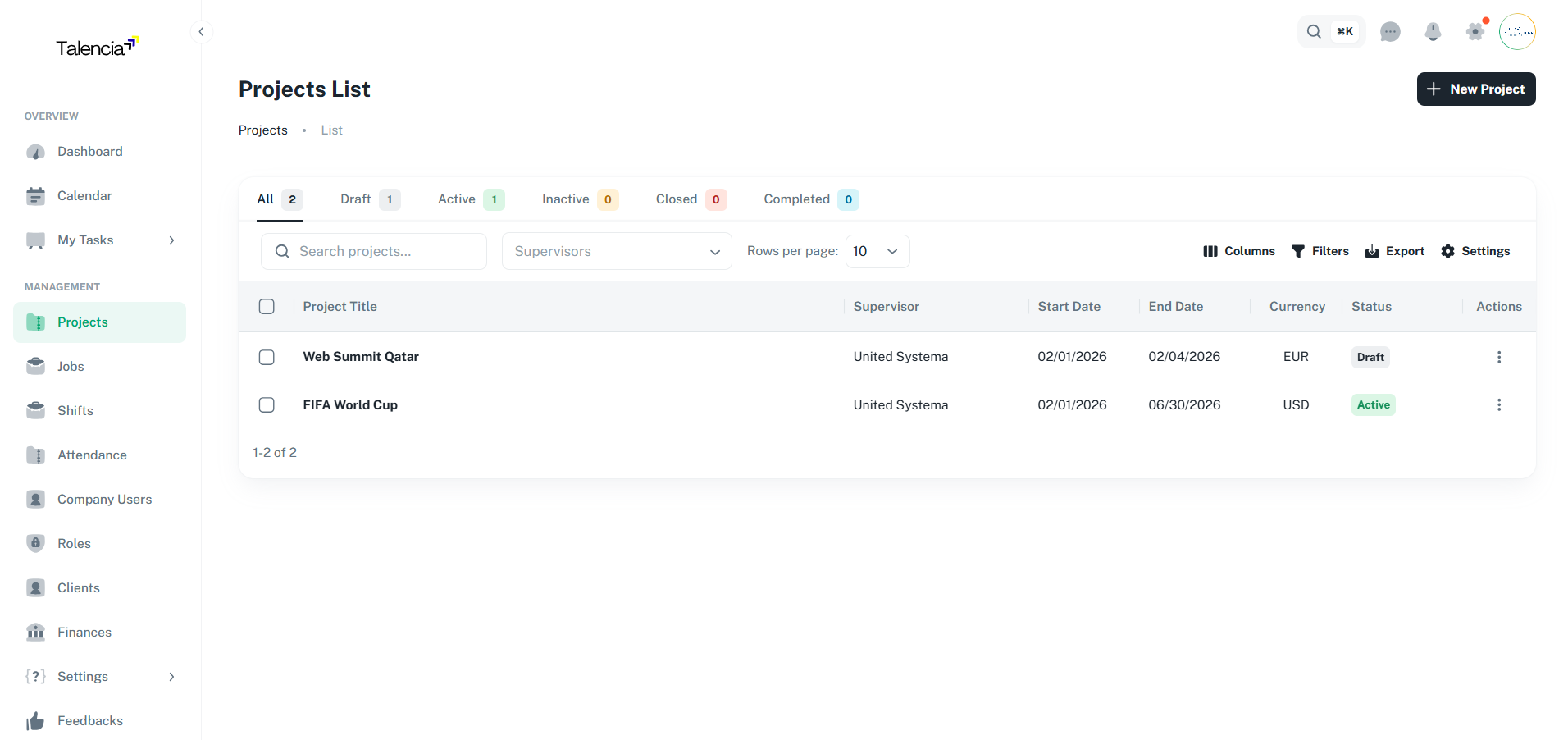
Search by project title or supervisor name with instant results.
Multi-supervisor Filter
Filter projects by multiple supervisors with autocomplete selection.
Status Tabs
Quick filter by project status with live count badges.
Server-side Pagination
Handle large datasets with configurable page sizes and "show all" option.
Column Sorting
Sort by any column including title, supervisor, dates, and status.
Bulk Operations
Select multiple projects for bulk deletion with confirmation dialog.
Column Visibility
Show/hide columns and customize table layout to your needs.
Density Controls
Adjust row density and table settings for optimal viewing.
Permissions
Required permissions for project operations.
| Action | Permission |
|---|---|
| View Projects List | projects.view |
| Create Project | projects.create |
| Edit Project | projects.update |
| Delete Project | projects.delete |
| Clone Project | projects.update |
| Export Projects | projects.view |
| View Project Overview | projects.view |
| Bulk Delete | projects.delete |
Merge Variables (Examples)
Available merge variables for project operations.
| Variable | Description |
|---|---|
{{ project.title }} | Project name/title |
{{ project.status }} | Current project status |
{{ project.supervisor_name }} | Assigned supervisor full name |
{{ project.start_date }} | Project start date |
{{ project.end_date }} | Project end date |
{{ project.total_cost }} | Total project cost |
{{ project.currency }} | Project currency code |
Data Grid Visual Examples
Visual demonstrations of project management interfaces.
Data Table Projects
Main projects list with advanced filtering and bulk operations
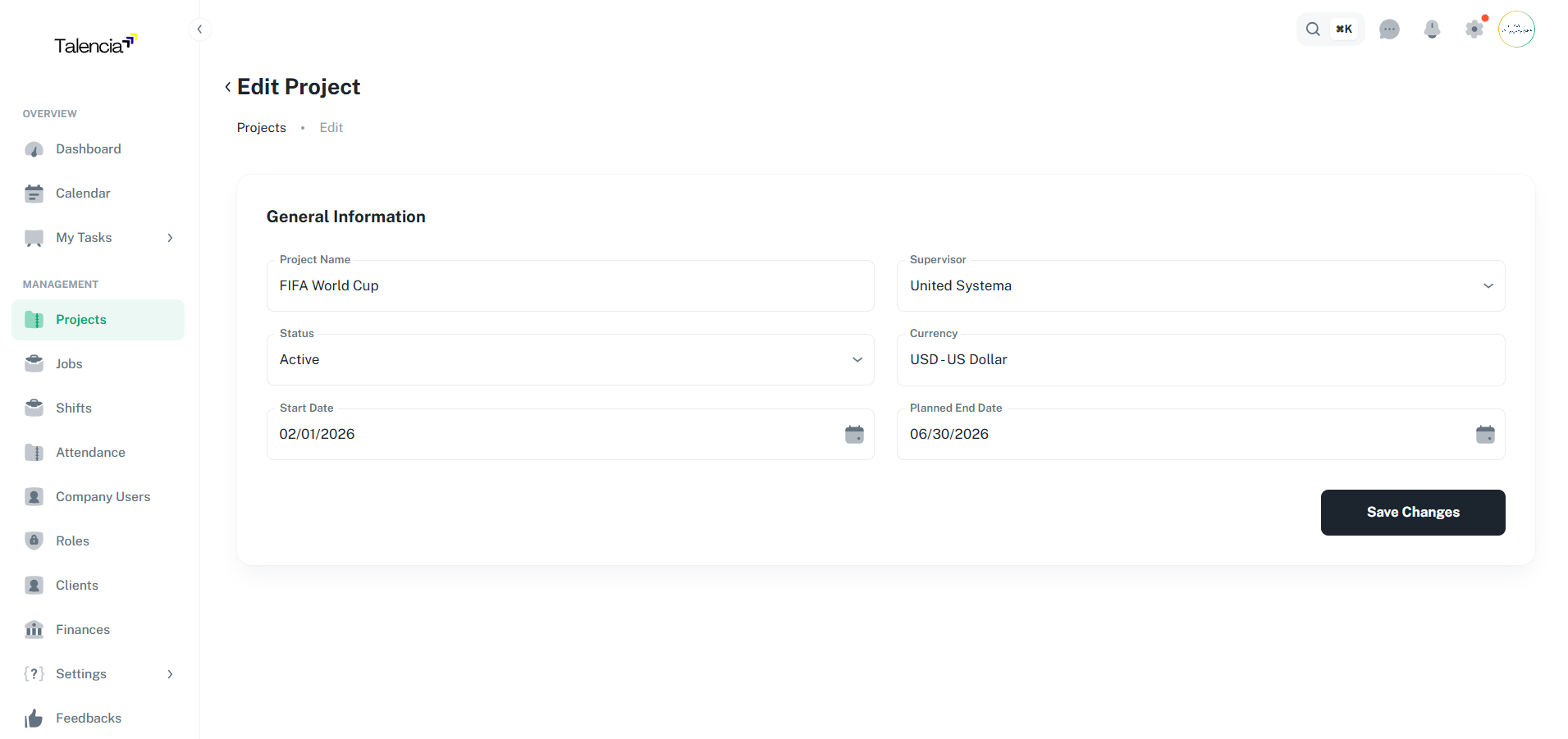
Update Project
Project editing interface with form validation and status management
Project Overview
Comprehensive project analytics and statistics dashboard
Best Practices
Project management guidelines.
| Practice | Recommendation |
|---|---|
| Project Planning | Define clear scope, timeline, and deliverables before activation |
| Supervisor Assignment | Assign experienced supervisors with proper permissions |
| Status Management | Regularly update project status to reflect current state |
| Cost Tracking | Set appropriate billing type (hourly/daily) and monitor budgets |
| Data Management | Use export feature for regular backups and reporting |
Troubleshooting
Common issues and solutions.
| Issue | Fix |
|---|---|
| Can't create a new project | Contact your administrator to ensure you have the right permissions to create projects |
| Projects list not showing | Try refreshing the page or check your internet connection. If the issue persists, contact support |
| Can't find the copy project option | This feature may not be available for your role. Please check with your system administrator |
| Download to Excel not working | Make sure your browser allows downloads and try again. If it still fails, try using a different browser |
| Project status won't change | Ensure all required fields are filled in. Some status changes may require supervisor approval |
| Can't delete multiple projects | You can only delete projects you created. For other projects, contact the project owner or administrator |