Feedbacks
Improvement · Evaluation · Analytics
Feedback Management
The feedback system enables continuous improvement through structured collection and analysis of stakeholder input. Feedback management encompasses performance evaluations, satisfaction surveys, and continuous improvement processes across all stakeholders.
Performance reviews
Staff performance evaluation.
Client satisfaction
Client feedback collection.
Action tracking
Follow-up and improvement monitoring.
Key Features
Comprehensive feedback tools.
Performance Reviews
Staff performance evaluation.
Client Satisfaction
Client feedback collection.
360-degree Feedback
Comprehensive input gathering.
Feedback Analytics
Trend analysis and insights.
Action Tracking
Follow-up and improvement monitoring.
Feedback Types
Various feedback categories.
Staff Performance
- Manager reviews
- Peer assessments
- Self-assessments
- Client feedback
Client Satisfaction
- Service quality ratings
- Staff performance
- Communication effectiveness
- Problem resolution
System Feedback
- User experience
- Feature requests
- Bug reports
- Process improvement
Feedback Collection Methods
Various feedback gathering approaches.
Surveys & Questionnaires
- Customizable templates
- Automated distribution
- Anonymous options
- Multi-language support
- Mobile-friendly interfaces
Direct Feedback
- One-on-one meetings
- Performance reviews
- Client check-ins
- Suggestion boxes
- Hotline support
Automated Feedback
- Post-interaction surveys
- Event-triggered requests
- Continuous monitoring
- Sentiment analysis
- Behavior-based prompts
Feedback Management
End-to-end feedback processes.
Collection Process
- Planning: Define objectives
- Design: Create instruments
- Distribution: Send to stakeholders
- Collection: Gather responses
- Analysis: Process data
Analysis & Reporting
- Quantitative analysis
- Qualitative themes
- Trend analysis
- Benchmarking comparisons
- Actionable insights
Action & Follow-up
- Improvement plan development
- Responsibility assignment
- Timeline establishment
- Progress monitoring
- Results communication
Feedback Analytics
Data-driven insights and metrics.
Performance Metrics
- Staff performance trends
- Client satisfaction scores
- Improvement area identification
- Success factor analysis
- Predictive modeling
Reporting Dashboards
- Real-time feedback visualization
- Trend analysis charts
- Comparative analytics
- Goal tracking
- Executive summaries
Best Practices
Effective feedback management.
Regular Schedules
Regular feedback collection schedules.
Multiple Channels
Multiple feedback channels.
Actionable Focus
Actionable feedback focus.
Confidentiality
Confidentiality and trust.
Feedbacks Management Overview
Visual guide to feedback management features.
This video demonstrates the complete feedback management workflow including feedback submission, rating system, filtering capabilities, and administrative operations.
Data Grid Features
Advanced table capabilities.
Real-time Search
Search by comment, user name, project, or rating with instant results.
User Filter
Filter feedbacks by specific users with autocomplete selection.
Rating Filter
Filter by rating values and points for performance analysis.
Date Filtering
Filter feedbacks by specific date ranges with calendar picker.
Column Sorting
Sort by any column including date, user, rating, and project.
Bulk Operations
Select multiple feedbacks for bulk deletion with confirmation.
Export Functionality
Export feedbacks to Excel with applied filters and sorting.
Column Visibility
Show/hide columns and customize table layout to your needs.
Permissions
Required permissions for feedback operations.
| Action | Permission |
|---|---|
| View Feedbacks List | feedbacks.view |
| Create Feedback | feedbacks.create |
| Edit Feedback | feedbacks.update |
| Delete Feedback | feedbacks.delete |
| Export Feedbacks | feedbacks.view |
| Bulk Delete | feedbacks.delete |
Merge Variables (Examples)
Available merge variables for feedback operations.
| Variable | Description |
|---|---|
{{ feedback.comment }} | Feedback comment text |
{{ feedback.user_name }} | Full name of feedback recipient |
{{ feedback.project_name }} | Associated project title |
{{ feedback.rating_value }} | Rating value (e.g., "Excellent") |
{{ feedback.rating_points }} | Rating points numerical value |
Visual Examples
Visual demonstrations of feedback management interfaces.
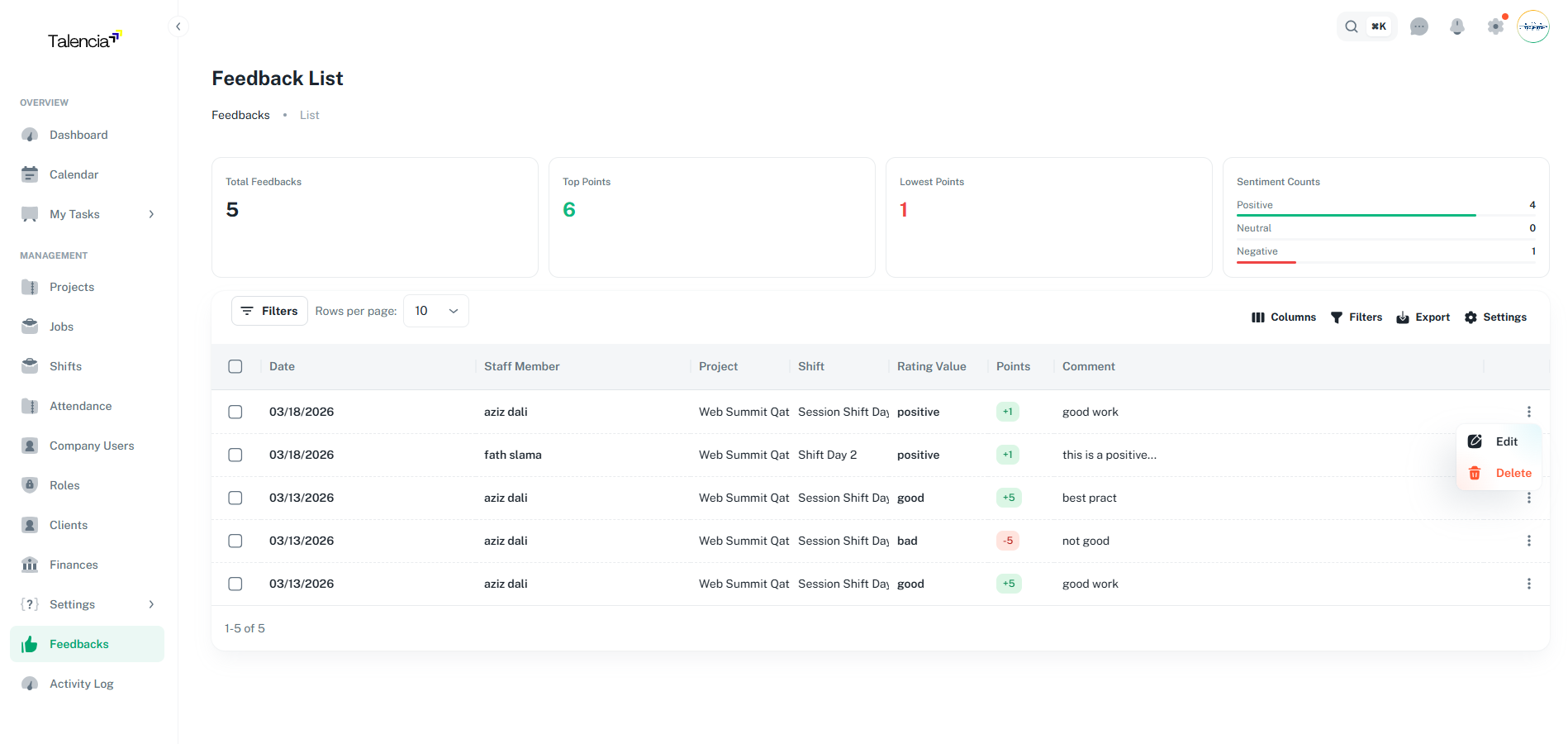
Feedbacks Data Table
Main feedbacks list with advanced filtering, search, and bulk operations
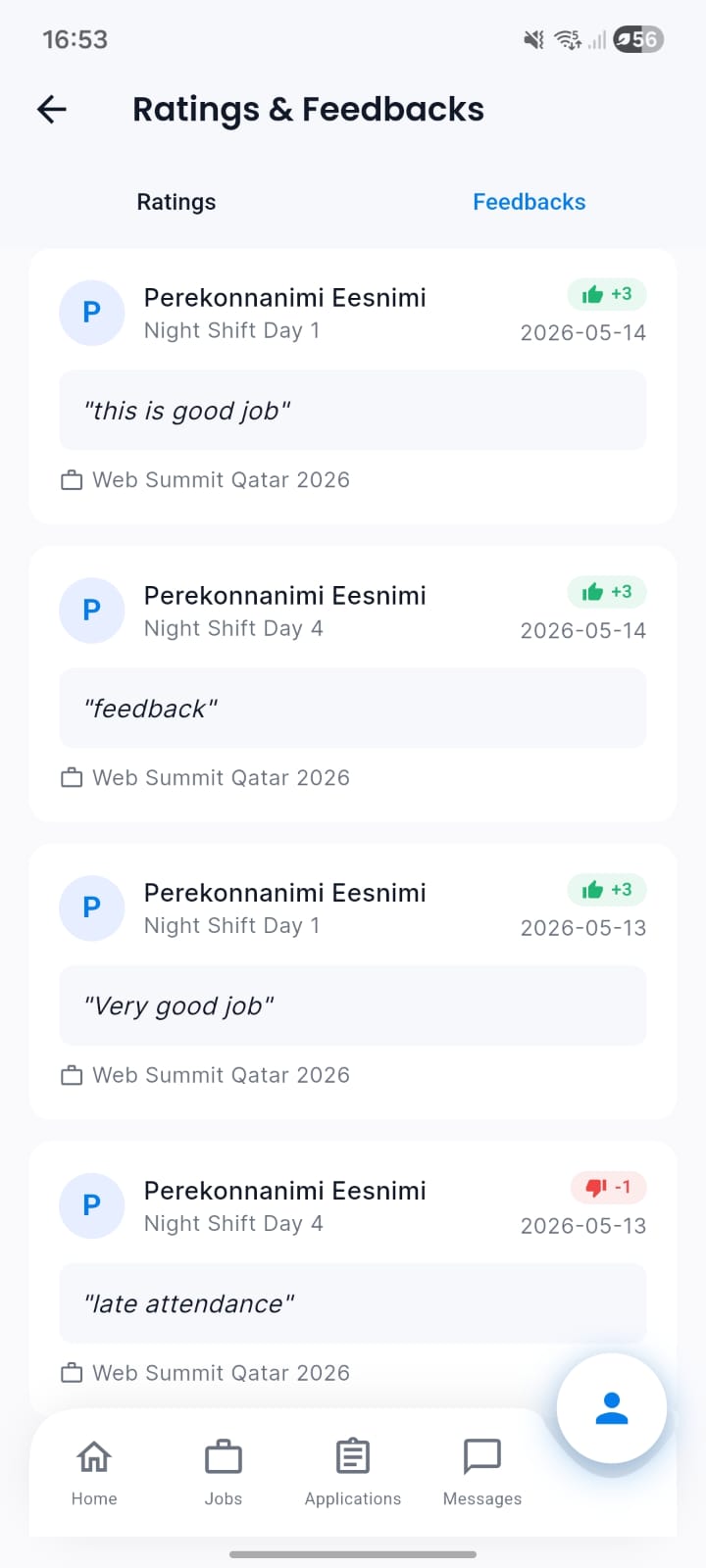
Talent receives feedback on their mobile application. Feedback can affect their rating, values, and points.
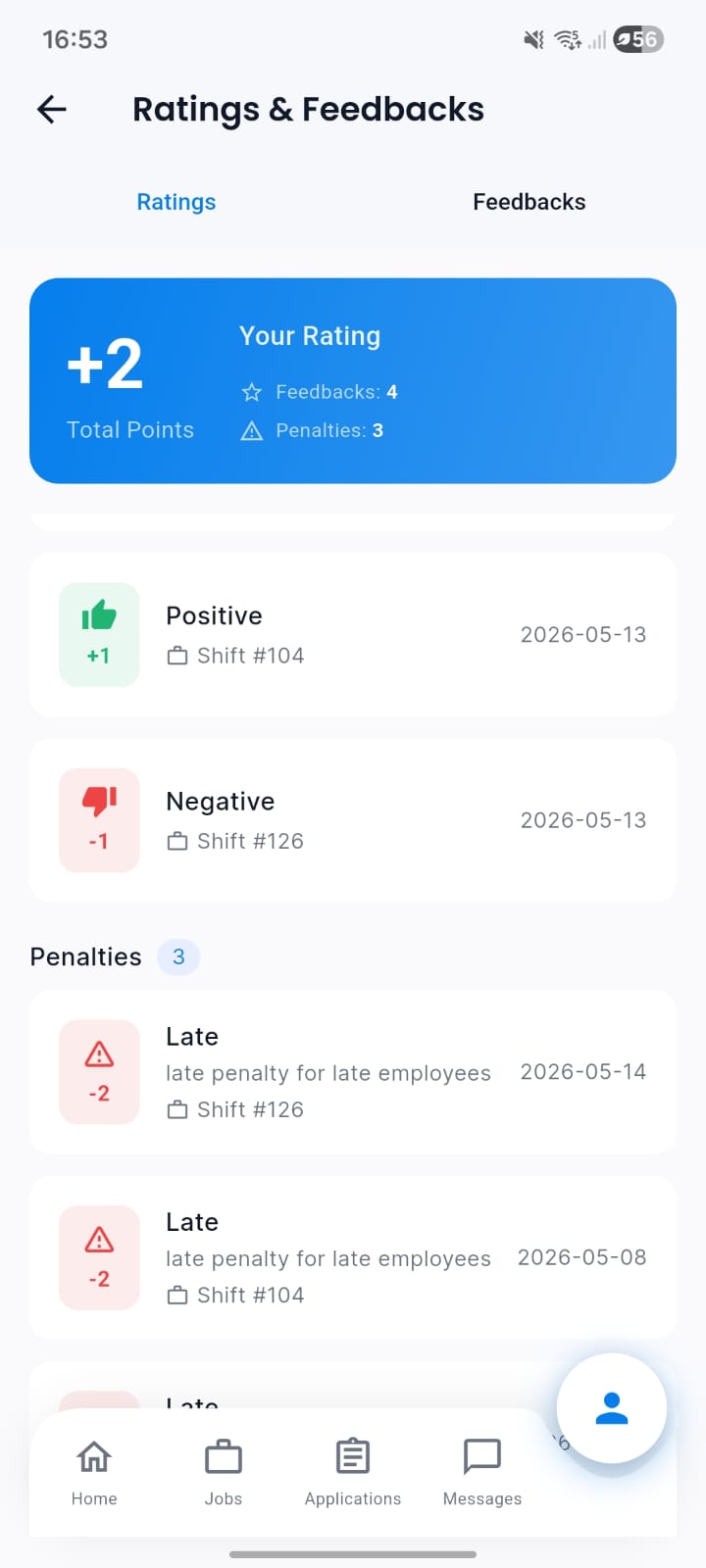
Talent's rating and points overview, influenced by received feedback.
Best Practices
Feedback management guidelines.
| Practice | Recommendation |
|---|---|
| Regular Collection | Schedule regular feedback collection to maintain continuous improvement |
| Anonymous Options | Provide anonymous feedback options for honest and candid responses |
| Actionable Insights | Focus on collecting actionable feedback that can drive improvements |
| Follow-up Process | Establish clear follow-up processes for addressing feedback |
| Data Analysis | Regularly analyze feedback trends to identify patterns and areas for improvement |
Troubleshooting
Common issues and solutions.
| Issue | Fix |
|---|---|
| Can't create new feedback | Contact your administrator to ensure you have the right permissions to create feedback |
| Feedback list not showing | Try refreshing the page or check your internet connection. If the issue persists, contact support |
| Download to Excel not working | Make sure your browser allows downloads and try again. If it still fails, try using a different browser |
| Filters not working correctly | Make sure you select valid filter options and try again |
| Ratings not displaying | Contact your administrator to ensure rating system is properly configured |
Integration with Other Systems
- Performance Management - Role-based feedback
- Client Management - Client satisfaction tracking
- Training - Skill development feedback
- Communication - Feedback collection channels
Privacy and Ethics
- Confidential feedback handling
- Anonymous feedback options
- Data protection compliance
- Ethical feedback practices
- Transparency in feedback usage